
Download Bottomright – AI‑Powered Customer Support Chatbot for Websites
Overview
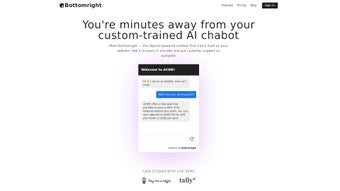
Bottomright is an AI‑driven chatbot built to transform how startups, solo founders, and growing businesses handle customer support on their websites. Leveraging the latest OpenAI models, Bottomright learns directly from a site’s own content, ensuring that every answer it provides is context‑aware, accurate, and on‑brand. The platform is designed for rapid deployment: a few clicks are enough to embed a responsive chat window that works 24/7, freeing human agents from repetitive inquiries and allowing them to focus on higher‑value tasks.
The core of Bottomright’s intelligence lies in its ability to crawl the pages you designate, extract FAQs, product specifications, policy statements, and even blog articles, and then fine‑tune a large language model on that specific data set. This approach eliminates the “generic‑answer” problem common in many chatbot solutions, because the AI speaks in the tone and terminology of your own brand. Whether you run an e‑commerce store, a SaaS landing page, or a nonprofit information hub, Bottomright can adapt to the unique vocabulary and user expectations of your niche.
Bottomright offers a generous free tier that includes training on up to five pages, a configurable monthly message quota, and a visual editor for customizing the bot’s appearance. For teams that need higher volume or advanced analytics, paid plans unlock additional message capacity, priority support, deeper integration options, and multilingual language packs. Pricing is transparent, with monthly and annual billing cycles, and a 14‑day money‑back guarantee that removes risk for early adopters.
Security is baked into every layer of the service. All data exchanges between the chatbot and visitors are encrypted via HTTPS, and the backend storage complies with GDPR and CCPA regulations. Users can request data export or deletion at any time, and Bottomright provides detailed audit logs for compliance teams. In short, Bottomright blends the power of modern AI with a user‑friendly interface, delivering a secure, scalable, and cost‑effective solution for anyone looking to boost engagement and improve support efficiency.
Key Features & Installation Guide
Feature List
- AI‑Powered Contextual Replies – Trains on website content for accurate answers.
- 24/7 Automated Support – Handles unlimited visitors without human fatigue.
- Free Tier with Core Capabilities – Includes multi‑page training and monthly message quota.
- Brand‑Consistent Design – Drag‑and‑drop editor to match colors, fonts, and logo.
- Multi‑Channel Integration – Works on web, WordPress, Shopify, and custom sites.
- Secure Data Handling – GDPR‑compliant storage and encrypted communication.
- Analytics Dashboard – Real‑time insights into chat volume, satisfaction scores, and common queries.
- Scalable Paid Plans – Expand message limits, add team members, and access priority support.
- Multilingual Support – Language packs for English, Spanish, French, German, and more (available on paid tiers).
- Custom Intent Builder – Define specific triggers such as “track order” or “request a demo” to guide the AI’s response flow.
Step‑by‑Step Installation & Usage
Getting Bottomright up and running is intentionally straightforward, allowing non‑technical founders to launch a live chatbot within minutes. The following guide walks you through every stage, from account creation to ongoing maintenance.
- Create an Account: Visit the Bottomright website and sign up using an email address or single‑sign‑on (SSO) option such as Google or Microsoft. After confirming your email, you’ll be directed to the main dashboard where you can start building your bot.
- Select a Plan: Choose the free plan for a risk‑free trial or upgrade to a paid tier if you anticipate higher traffic. All plans include a 14‑day money‑back guarantee, and the upgrade can be performed at any time without losing existing data.
- Connect Your Site: In the dashboard, click “Add New Bot,” then paste the URL of the website you wish to train. Bottomright will crawl the pages you specify (up to 5 pages on the free tier) and extract relevant information. You can manually add or remove pages, set crawl depth, and define exclusion rules for private sections.
- Configure the Chat Widget: Use the visual editor to adjust colors, greeting messages, and placement (bottom‑right corner is default). Upload your logo, select a welcome phrase, and enable optional features such as “typing indicator” or “quick reply buttons.” The editor provides a live preview on desktop and mobile viewports.
- Generate the Embed Code: Bottomright provides a short JavaScript snippet that looks like
. Copy it and paste it just before the closingtag of your site’s HTML. For WordPress, Shopify, or Wix users, a dedicated plugin or app streamlines this step with a one‑click install. - Test & Refine: Open your site in a private browser window and interact with the bot. The dashboard shows live logs, response confidence scores, and the ability to edit answers on the fly. Use the “Training” tab to add custom intents, synonyms, or fallback responses for questions the AI doesn’t understand.
- Monitor & Update: As you publish new content, return to the “Training” tab and re‑run the crawler. Bottomright will seamlessly incorporate fresh information without downtime. The analytics dashboard also lets you track key metrics such as average handling time, satisfaction rating, and the most common user queries.
- Advanced Integrations (Paid Plans): Connect Bottomright to your CRM, ticketing system, or email marketing platform via Zapier, webhook, or native API. This enables automatic ticket creation for unresolved issues, personalized follow‑up emails, and lead capture directly from the chat widget.
Because Bottomright runs in the cloud, there are no software updates to install on your server. All improvements, security patches, and model upgrades are pushed automatically, ensuring your chatbot remains fast, secure, and up‑to‑date. If you encounter any hiccups, the knowledge base and community forum provide step‑by‑step troubleshooting guides, and priority email support is available for paid subscribers.
Compatibility, Pros & Cons
Supported Operating Systems & Platforms
Bottomright is a web‑based SaaS solution, meaning it works across all major operating systems and browsers. Whether your visitors are on Windows 10/11, macOS Monterey or Ventura, Android 12+, or iOS 16+, the chat widget adapts responsively, providing a consistent experience on desktops, tablets, and smartphones. The admin dashboard is optimized for Chrome, Edge, Firefox, and Safari, delivering a reliable interface for support teams regardless of device. Because the service is hosted in the cloud, there is no client‑side installation required, and all updates are applied server‑side.
Pros
- Instant 24/7 support without hiring additional staff.
- Contextual answers derived from your own site content, reducing irrelevant or generic replies.
- Generous free plan suitable for early‑stage startups and solo entrepreneurs.
- Easy visual customization matches brand identity and boosts user trust.
- Secure, GDPR‑compliant data handling and encrypted traffic protect both you and your customers.
- Scalable pricing model grows with your traffic needs, allowing seamless upgrades.
- Multilingual capabilities enable global reach for growing businesses.
- Rich analytics help you understand visitor behavior and continuously improve the support experience.
Cons
- Free tier limits the number of pages that can be trained, which may require a paid upgrade for larger sites.
- Advanced analytics and custom intent builder are reserved for paid subscriptions, limiting insight for free users.
- Complex multi‑language support may require additional language packs and manual training for optimal accuracy.
- Initial AI training can produce generic responses until sufficient data is collected and fine‑tuned.
- Customization of deep workflow logic (e.g., multi‑step forms) may need developer assistance or higher‑tier plans.
FAQ & Final Thoughts
Frequently Asked Questions
-
Is Bottomright truly free to use?
Yes, Bottomright offers a free plan that includes training on up to five pages, a limited monthly message quota, and full access to the visual editor. The free tier is designed for startups and solo founders who need essential support without any financial commitment. You can upgrade at any time, and there are no hidden fees or credit‑card requirements to start the free trial.
-
Can I train the bot on new content after the initial setup?
Absolutely. Bottomright’s dashboard lets you re‑run the crawler anytime you publish new pages or update existing content. The AI model automatically incorporates the fresh data, keeping responses accurate and up‑to‑date. You can also add individual FAQs manually, ensuring the bot learns from both crawled material and custom entries.
-
Does Bottomright support multiple languages?
Bottomright can handle multilingual sites, but the free plan limits language models to English. For comprehensive multilingual support—including Spanish, French, German, and other major languages—you’ll need a paid plan that unlocks additional language packs and custom training capabilities. The platform also allows you to set language‑specific crawls, ensuring each version of your site receives accurate localized answers.
-
How secure is the data processed by Bottomright?
All communications between the chatbot and your visitors are encrypted via HTTPS. Bottomright is GDPR‑compliant, stores data in encrypted databases, and provides options for data export or deletion upon request. Enterprise customers can also sign a Data Processing Addendum (DPA) for additional compliance guarantees.
-
What kind of support does Bottomright offer to its users?
Free‑plan users receive community‑forum assistance and a comprehensive knowledge base that covers setup, troubleshooting, and best practices. Paid subscribers gain access to priority email support, live chat with the Bottomright team, and a dedicated account manager for enterprise accounts. Additionally, the platform offers weekly webinars and on‑demand video tutorials to help you get the most out of the AI features.
Conclusion – Should You Download Bottomright?
Bottomright delivers a compelling mix of AI intelligence, ease of use, and affordability that makes it a standout choice for any business looking to upgrade its website support. The free tier alone provides enough functionality to test the concept, while the paid options scale seamlessly as your traffic and support demands grow. By automating routine inquiries, you free up valuable human resources, improve response times, and create a consistent brand experience for every visitor—whether they’re browsing on Windows, macOS, Android, or iOS.
In addition to 24/7 availability, Bottomright’s secure architecture, GDPR compliance, and automatic cloud updates give you peace of mind that your data and your customers’ data are protected. The rich analytics dashboard equips you with actionable insights, enabling continuous refinement of both the chatbot and your overall support strategy. If you’re ready to enhance engagement, reduce support costs, and future‑proof your customer service with a secure, constantly‑updated tool, download Bottomright today and start turning website traffic into satisfied, loyal customers.
Pros: 24/7 AI support, easy branding, generous free tier, secure data handling, multilingual options.
Cons: Limited training pages on free plan, advanced analytics behind a paywall, initial generic responses until sufficient training data is gathered.



.png)



